
给兰空图床增加一个机器人登录提醒
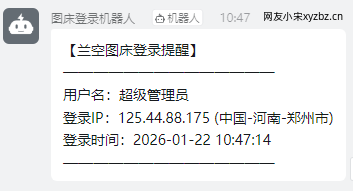
无聊的功能之一,有需要的可以尝试一下,豆包帮忙写的,登录会触发机器人推送消息。
1、增加注册事件与监听器
路径/app/Providers/EventServiceProvider.php
<?php

namespace App\Providers;

use Illuminate\Auth\Events\Login;
use Illuminate\Auth\Events\Registered; // 补回原有事件
use Illuminate\Auth\Listeners\SendEmailVerificationNotification; // 补回原有监听器
use Illuminate\Foundation\Support\Providers\EventServiceProvider as ServiceProvider;
use App\Listeners\SendLoginNotification; // 登录提醒监听器

class EventServiceProvider extends ServiceProvider
{
    /**
     * 应用程序的事件监听器映射
     *
     * @var array<class-string, array<int, class-string>>
     */
    protected $listen = [
        // 原有:用户注册事件(补回)
        Registered::class => [
            SendEmailVerificationNotification::class,
        ],
        // 新增:登录成功提醒(保留)
        Login::class => [
            SendLoginNotification::class,
        ],
    ];

    public function boot(): void
    {
        //
    }

    public function shouldDiscoverEvents(): bool
    {
        return false;
    }
}
2、增加文件SendLoginNotification.php
编写监听器逻辑
路径/app/Listeners/SendLoginNotification.php
<?php
namespace App\Listeners;
use Illuminate\Auth\Events\Login;
use Illuminate\Support\Facades\Log;
use Illuminate\Http\Request;
use Carbon\Carbon;
use Illuminate\Support\Facades\Http;
class SendLoginNotification
{
protected $request;
public function __construct(Request $request)
{
$this->request = $request;
}
public function handle(Login $event)
{
$user = $event->user;
try {
// 关键修改:将 username 改为 name(适配兰空图床字段)
$username = '未知用户';
if (isset($user->name) && !empty($user->name)) {
$username = $user->name;
}
$email = '未知邮箱';
if (isset($user->email) && !empty($user->email)) {
$email = $user->email;
}
// 已删除 $device 相关定义和赋值
$loginData = array(
'username' => $username, // 这里键名不影响,值已正确获取
'email' => $email,
'ip' => $this->request->ip(),
'ip_location' => $this->getIpLocation($this->request->ip()),
// 已删除 'device' => $device 字段
'time' => Carbon::now()->format('Y-m-d H:i:s'),
);
$this->sendDingTalkNotificationWithSign($loginData);
} catch (\Exception $e) {
$errUser = '未知用户';
if (isset($user->name) && !empty($user->name)) {
$errUser = $user->name;
}
Log::error("钉钉登录提醒执行异常:" . $e->getMessage() . ",用户:" . $errUser);
}
}
/**
* 钉钉加签提醒(兼容所有PHP版本)
*/
private function sendDingTalkNotificationWithSign($loginData)
{
try {
// ========== 替换为你的钉钉信息 ==========
$dingWebhook = 'https://oapi.dingtalk.com/robot/send?access_token=xxxxxxxxxxxxx';
$dingSecret = 'SECxxxxxxxxxxxxxxxxxxxxxxxxxxxxxx';
// ======================================
// 生成加签参数(兼容写法)
$timestamp = time() * 1000;
$signStr = $timestamp . "\n" . $dingSecret;
$sign = base64_encode(hash_hmac('sha256', $signStr, $dingSecret, true));
$sign = urlencode($sign);
// 拼接链接
$finalDingWebhook = $dingWebhook . "×tamp=" . $timestamp . "&sign=" . $sign;
// 构造钉钉消息(用array而非短数组,兼容低版本)
$dingMessage = array(
'msgtype' => 'text',
'text' => array(
'content' => "【兰空图床登录提醒】\n" .
"——————————————\n" .
"用户名:" . $loginData['username'] . "\n" .
"登录IP:" . $loginData['ip'] . " (" . $loginData['ip_location'] . ")\n" .
// 已删除 登录设备 展示行
"登录时间:" . $loginData['time'] . "\n" .
"——————————————"
)
);
// 发送请求(兼容写法)
$response = Http::withHeaders(array('Content-Type' => 'application/json'))
->post($finalDingWebhook, $dingMessage);
// 验证响应(移除===,用==兼容)
if ($response->successful() && $response->json('errcode') == 0) {
Log::info("钉钉提醒发送成功,用户:" . $loginData['username']);
} else {
Log::error("钉钉提醒失败,响应:" . $response->body());
}
} catch (\Exception $e) {
Log::error("钉钉加签发送异常:" . $e->getMessage());
}
}
/**
* IP归属地查询(兼容所有PHP版本)
*/
private function getIpLocation($ip)
{
if (in_array($ip, array('127.0.0.1', '::1'))) {
return '本地网络';
}
try {
$response = Http::timeout(3)->get("http://ip-api.com/json/" . $ip . "?lang=zh-CN");
$data = $response->json();
if ($data['status'] == 'success') {
return $data['country'] . '-' . $data['regionName'] . '-' . $data['city'];
} else {
return '未知地区';
}
} catch (\Exception $e) {
Log::warning("IP归属地查询失败:" . $e->getMessage());
return '未知地区';
}
}
}3、创建钉钉机器人获取地址和加签秘钥,配置到代码里面
log记录在/storage/logs里面
✦ ✦ ✦ 结束了 ✦ ✦ ✦
- 上一篇: 松声|廿六年·一月初·雪叩窗
- 下一篇: 松声|廿六年·雪后早上
钉钉的md格式消息好像有点问题,在电脑上正常显示,手机上显示md源码
功能不错,可惜动手能力不行,先慢慢学习,找机会看是否有可能移植到自己构建的图床。
把代码发给ai会帮你写的
目前没发现
用的群聊机器人的hook? 什么系统的手机?
webhook与手机无关的。
不用钉钉啊,同样思路可以搞个登录邮件提醒也不错
是的。可以集合多种webhook机器人
哇,代码写的很专业啊!
毕竟人工智能
code写的不错
豆包水平还是在线的
试过几个AI后,也是感觉豆包写的代码不错
有时候也很智障,会给你无限叠代码
个人感觉豆包写代码不如deepseek
都是随机好用的产物。
之前kimi也是挺好用的 可惜了现在弱智了
还是你会搞😏 这功能在我看来就像有也不错没有也行的。用来监测是否有非法的成功登陆倒也不错。
的确原本有想法监测非法登录的,多加一个判断就行了,但是没必要哈,万一有人闲的慌的,钉钉不得提醒死。
我一直想搭建一个图床供自己使用,搭建后又怕被刷量欠费😂,用阿里云或者七牛云的服务。
不用云存储就行了,存储选择本地